
⏳ 4 min read
As an early-stage software engineer, I’ve always been working on the development side of things. The procedure is simple: receiving a set of requirements, and translating them into working code. The focus here is on optimization, covering edge cases like an impatient user clicking the same button 56 times and ensuring nothing breaks. The story ended when my work reached production, and the testing team’s green signal. The cycle repeated every sprint, and I didn’t think beyond it.
A little context
My perspective changed when I took a Human-Computer Interaction course as part of my masters degree. As someone who likes art and designing, I went in excited thinking about getting to play around with color palettes, page layouts and visual elements. But it was here, that I truly understood the meaning and importance of ‘User Experience’. And with a new project that I’m working on, it expanded that understanding because they not only affect the user, but the quality of development as well.
As someone who learns best by doing, I decided to develop a full-stack application from scratch which allows me to pick up new tools and also explore the phases that happen before and after the code, mainly the requirements gathering, the design decisions and the testing. The project is called ‘PetPals’, an animal adoption management system, complete with an RBAC system handling multiple different roles, multiple interconnected portals, a normalized database, insightful analytics for admins and an AI matching feature. It’s more complex than anything I’ve taken on before, but that is the point.
I began with the requirements gathering, which fed into the database design, API planning, and system architecture. These phases felt familiar, as they’ve been part of most academic and professional projects I’ve worked on
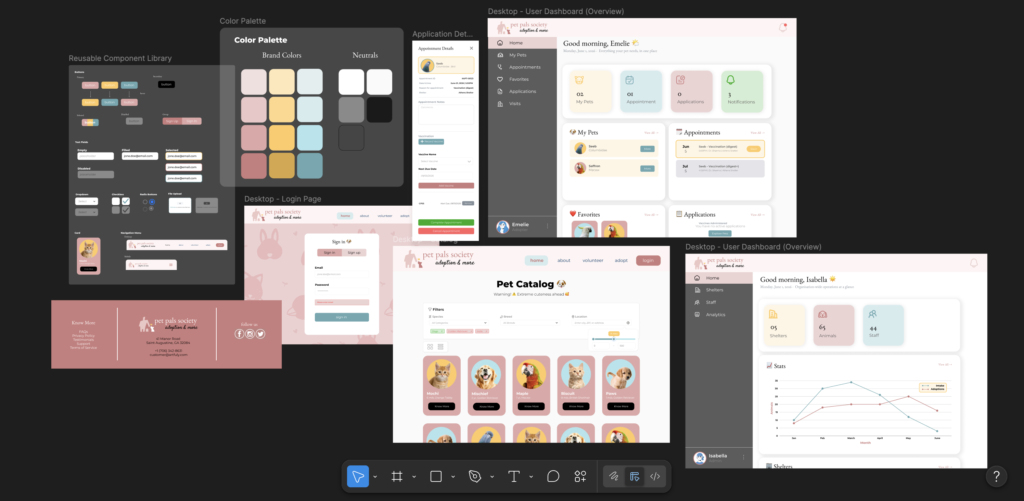
Following this, began 6 weeks of translating the requirements into landing pages and dashboards. Figma started feeling like the back of my hand. Going in, my expectation was that a visual high fidelity prototype would help me understand my project better.
However, it did a lot more than that.
- The UI reveals what the schema misses
At first, prototyping felt like surface-level decisions like where to place the navigation bar or how to structure a pet’s profile card. But as I moved deeper into designing edit panels and detail views, I started noticing gaps in my schema, and in my own understanding of what I actually needed to build. Some tables were missing fields that were fundamental from a user’s perspective. The UI was asking questions my database couldn’t answer.
None of these gaps were visible in a schema document. They only became apparent when I tried to build a screen that needed them
“Prototyping your UI before building your backend is, unexpectedly, one of the best ways to validate your data model.”
- Designing for a role means thinking like that role
While my requirements document described what a user needed, it didn’t answer where that information should live or how it should be surfaced.
Designing a dashboard meant asking questions like “what does this person need the moment they open the app?” It’s not just about dumping the database into a<div>, but also on how to categorize information, establish hierarchy, and decide what lives front and center versus what’s revealed on demand. That attention to detail is what sets apart the user experience of an intuitive application.
None of that specificity came from planning. It emerged from the act of designing.
- Patterns emerge that become components
Although I knew prototyping would help me identify reusable elements and build design consistency, I was surprised at how much potential reusable code it revealed.
Patterns emerged naturally through repetition. The visual consistency of the prototype became a foundation for cleaner, more maintainable code. While I’m not writing the code, the advantages of prototyping leaks into the development phase.
Prototyping is an investment which pays off in the quality and maintainability of everything you build after it.
- Reveals system complexities and mistakes in design early on
Most features, when working through the system design phase, seem figured out. While I expected hidden complexities to surface during coding, some of them came up during prototyping itself.
Take for instance, the vet appointment feature. While designing the data model, I assumed the vet would be responsible for scheduling appointments. But when I designed the actual flow, the real-world picture became clearer. An adopter would call the shelter to schedule appointments, not the vet. This meant, the shelter staff would primarily be responsible for creating appointments. Correcting the API design and updating the prototype took much less time compared to undoing it in code. Prototyping helped solidify the scope for many such features. I could see the cost before I paid it, and make an informed decision to simplify or defer.
Prototyping doesn’t just help you build the right thing. It helps you not build the wrong thing.
The hardest question: when do you stop?
Since this is an end-to-end project and not a UX-focused initiative, there were moments where layouts and elements started repeating with no new insights. I felt unsure if I was doing too much or too little?
How do you know if a particular component is worth the time and effort?
One rule I developed along the way was to skip a screen if it doesn’t introduce something new. If a component is structurally identical to one already designed, anyone reviewing the prototype will understand it without needing to see it. I only designed a screen if it introduced a new interaction, surfaced an open decision, or brought in an element with a meaningfully different structure.
Prototype to learn, not to document.
One thing worth mentioning: while I used Claude AI to assist with the database design and planning phases, I deliberately designed the actual screens in Figma myself. In the current technical landscape, this feels excessive and inefficient. But the goal here was to learn and build a foundation for not just the project, but for my own knowledge.
As I move on to scaffolding the frontend and backend systems, I feel confident about what I’m working towards. Having a clear picture of the end goal is an underrated advantage. Its effects will show up in the quality of work and the pace of completion.
I hope you found this useful. Thanks for reading!
— Karishma